UAE e-InvoicingCRM Software

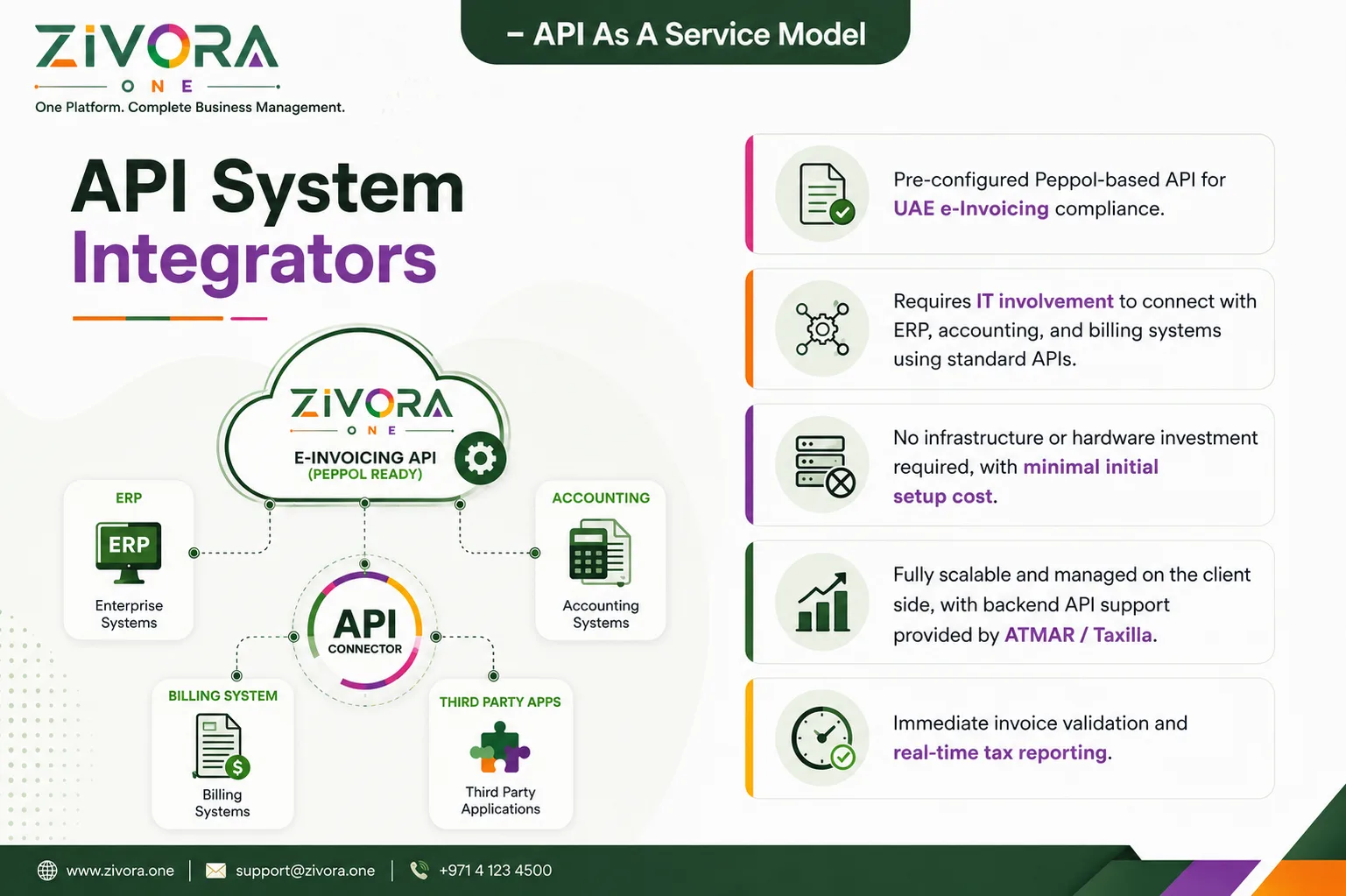
ZIVORA.ONE helps businesses prepare their existing ERP, accounting, billing or invoicing software for UAE e Invoicing. Our API connector works as a secure bridge between your business system and a UAE Accredited Service Provider. It converts invoice data into the required structured format, validates the information and supports electronic document exchange without replacing your existing software.

Request a Readiness Assessment
UAE e-Invoicing CRM Software

Whether your company uses SAP, Oracle, Microsoft Dynamics 365, Odoo, Zoho, Sage, Infor or a custom ERP, ZIVORA.ONE can provide a practical integration path.

Compatible ERP Platforms:
SAPOracleMicrosoft Dynamics 365OdooZohoSageInforCustom ERP
API as a Service
Keep Your Existing ERP. Add e-Invoicing Capability.

The ZIVORA.ONE API-as-a-Service model allows businesses to connect their current invoicing system to the UAE e-Invoicing network through a preconfigured API connecto

Your team can continue creating invoices inside the existing ERP or accounting platform. ZIVORA.ONE receives the required invoice data, checks it and prepares it for processing through the connected Accredited Service Provider.

This approach reduces the need for major changes to your daily operations.
ZIVORA.ONE API System Integrators software

How the Integration Works

Invoice information moves securely from your existing system through validation, conversion, processing and government reporting.

Invoice Data Created

Your ERP or accounting system generates invoice data.

Secure Data Transfer

The data is sent securely to the ZIVORA.ONE API connector.

Fields Checked

Required fields and formats are checked.

PINT AE Conversion

The invoice is converted into the applicable PINT AE XML structure.

ASP Submission

The document is submitted to the connected Accredited Service Provider.
Electronic Processing

The invoice is validated and electronically processed.

Status Returned

Status updates and acknowledgements are returned to your system.

Tax Data Reported

Tax data is reported through the applicable UAE e-Invoicing process.

UAE Five-Corner Framework

The UAE model uses a decentralized five-corner framework involving the supplier, buyer, their Accredited Service Providers and the government reporting platform.

Pre-Requisite Readiness Assessment
Know What Needs to Be Updated Before Integration

Every business has a different accounting setup. Before connecting the API, ZIVORA.ONE reviews your current system, invoice formats and available data.

The readiness assessment helps identify technical or information gaps before implementation begins.
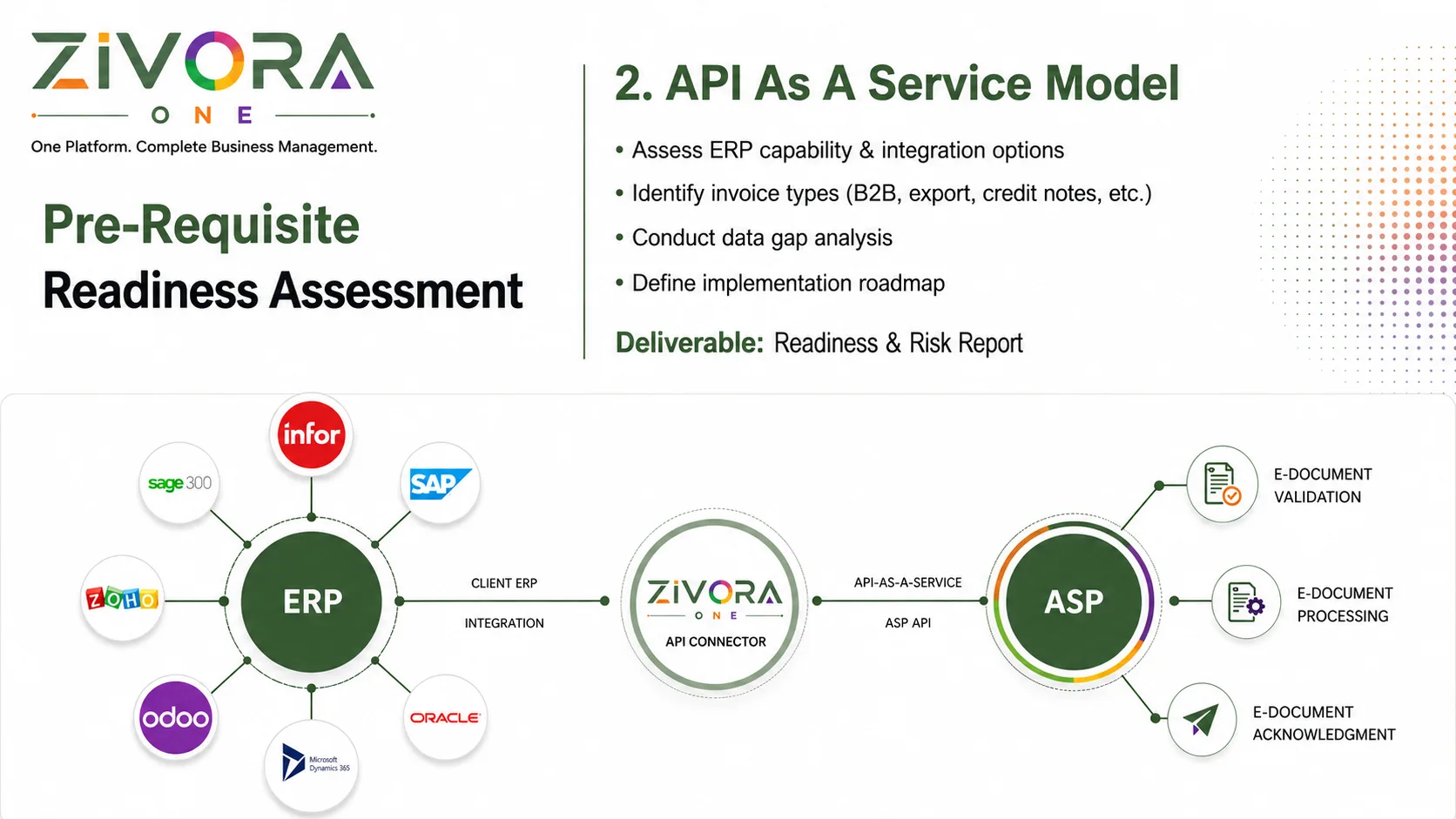
ZIVORA.ONE pre-requisite readiness assessment and API integration model

We review whether your ERP or accounting software can: Generate complete invoice information, Export data through an API or another supported method, Store the required seller and buyer details, Manage VAT rates and tax categories, Produce credit notes and other supported documents, Receive validation results and status updates, Maintain a reliable invoice audit trail.

Our team identifies the documents created by your business, which may include: Business-to-business invoices, Business-to-government invoices, Export invoices, Tax credit notes, Commercial invoices, Recurring invoices, Advance-payment invoices, Self-billing documents, where applicable.

Existing invoice templates may not contain every data element required under PINT AE. We compare the information currently stored in your system with the applicable e-Invoice requirements. Missing fields, incorrect formats and system limitations are recorded so they can be addressed before development begins.

After the assessment, ZIVORA.ONE provides a clear implementation plan covering: Required ERP changes, Field mapping, API connection requirements, Validation rules, Testing stages, User responsibilities, Estimated implementation phases, Go-live preparation.
Connect Multiple Business Systems
One Connector for Your Invoicing Environment

The ZIVORA.ONE API can connect different systems involved in creating or managing invoices.

ZIVORA.ONE API system integration model connecting ERP, accounting, billing and third-party applications
enterprise

ERP Systems

Connect enterprise platforms used to manage finance, procurement, sales and business operations.

account_balance_wallet

Accounting Software

Transfer invoice, customer, tax and payment information from your accounting platform.

receipt_long

Billing Systems

Connect subscription, utility, service or usage-based billing solutions.

extension

Third-Party Applications

Integrate industry-specific platforms, custom applications, eCommerce systems or internal business tools.

infoSupported integration depends on the API, export capabilities and data structure available in each system.
PINT AE e-Invoice Format
Structured XML for Electronic Processing

PINT AE is the UAE-specific invoice data specification used to structure e-Invoice information for electronic exchange.

Instead of sending only a visual document, the system produces structured XML data. This allows invoice information to be read, checked and processed automatically by different business platforms.

The required information is organised into six main groups.

data_objectinvoice.xmlStructured data
<Invoice><InvoiceDetails/><SellerDetails/><BuyerDetails/><DocumentTotals/><TaxBreakdown/><InvoiceLines/></Invoice>
automationStructured XML allows invoice data to be validated, exchanged and processed automatically.
receipt_long
Group 01

Invoice Details

This section identifies the invoice and explains how it should be processed. It may include:

  • checkInvoice number
  • checkInvoice issue date
  • checkInvoice type code
  • checkInvoice currency
  • checkTransaction type
  • checkPayment due date
  • checkBusiness process type
  • checkSpecification identifier
  • checkPayment method

Each invoice should have a unique reference so it can be traced throughout the exchange and reporting process.

store
Group 02

Seller Details

Seller information identifies the business issuing the invoice. It may include:

  • checkLegal business name
  • checkRegistered address
  • checkElectronic address
  • checkElectronic identifier
  • checkTrade licence information
  • checkTax Registration Number
  • checkTax scheme
  • checkCity and country
  • checkCountry subdivision
  • checkCountry code

The information should match the company’s official registration and tax records.

person_search
Group 03

Buyer Details

Buyer information identifies the customer receiving the e-Invoice. Depending on the transaction, this may include:

  • checkBuyer’s legal name
  • checkElectronic address
  • checkElectronic identifier
  • checkTax identifier
  • checkTax scheme
  • checkRegistered address
  • checkCity
  • checkCountry subdivision
  • checkCountry code

Accurate buyer information is important because the invoice is electronically routed to the receiving business.

calculate
Group 04

Document Totals

This group explains how the final invoice value was calculated. It may contain:

  • checkTotal value of invoice lines
  • checkTotal amount excluding VAT
  • checkTotal VAT amount
  • checkTotal amount including VAT
  • checkAllowances
  • checkAdditional charges
  • checkPaid amount
  • checkRounding adjustment
  • checkPayable amount

The totals must match the values calculated from the invoice lines and VAT breakdown.

percent
Group 05

Tax Breakdown

The tax section provides a clear calculation for each applicable VAT category. It can include:

  • checkTaxable amount
  • checkVAT amount
  • checkTax category code
  • checkVAT rate
  • checkExemption information
  • checkwhere relevant

ZIVORA.ONE checks the relationship between taxable values, VAT rates and calculated tax amounts before submission.

format_list_numbered
Group 06

Invoice Lines

Every product or service is recorded as a separate invoice line. An invoice line may include:

  • checkLine identifier
  • checkItem name
  • checkItem description
  • checkQuantity
  • checkUnit of measurement
  • checkUnit price
  • checkPrice base quantity
  • checkNet line amount
  • checkTax category
  • checkVAT rate
  • checkVAT amount
  • checkAllowances or charges

Structured line-level information allows invoices to be processed with less manual data entry.

UAE Electronic Tax Invoice
A Clear Business Document Supported by Structured Data

ZIVORA.ONE can produce a readable tax invoice for business use while maintaining the structured information required for electronic processing.

A typical invoice can display:

domainSeller and buyer information
verifiedTax Registration Numbers
receipt_longInvoice number and issue date
eventPayment due date
currency_exchangeCurrency and payment details
schemaProcess and specification references
inventory_2Product or service details
calculateQuantities and prices
percentVAT category and rate
account_balanceTaxable amount and VAT
paymentsTotal payable amount
qr_code_2QR or verification reference
hubThe visual invoice helps people review the transaction, while the structured XML carries the machine-readable information used for validation, exchange and reporting.
<SellerParty><TaxTotal><InvoiceLine><PayableAmount>
ZIVORA.ONE
TAX INVOICEفاتورة ضريبية
SellerZIVORA.ONE Solutions
TRN 100000000000003
BuyerExample Trading LLC
Dubai, United Arab Emirates
Invoice No.ZV-INV-2026-0812
Issue / Due Date12 Aug / 11 Sep 2026
DescriptionQtyVATTotal
API Integration Service15%AED 4,200
Validation & Setup15%AED 800
SubtotalAED 5,000
VAT 5%AED 250
Total DueAED 5,250
PINT-AE / XML
Electronic Ref: AE-ZV-80261
Invoice Validation and Status Updates

Before an invoice is processed, ZIVORA.ONE can check required information and basic calculation consistency.

fact_checkValidation may cover:
check_circleRequired fields
check_circleAccepted data formats
check_circleSeller and buyer identifiers
check_circleCurrency codes
check_circleInvoice type codes
check_circleVAT calculations
check_circleInvoice-line totals
check_circleDocument totals
check_circleDuplicate invoice references
check_circleXML structure
check_circleApplicable business rules

After submission, the system can receive and display processing acknowledgements or error responses. This helps your finance team correct rejected documents without relying on manual follow-up.

Why Choose ZIVORA.ONE?
Practical Integration Without Replacing Your ERP

ZIVORA.ONE is designed to add e‑Invoicing capability to the tools your business already uses.

cloud

Lower Initial Setup Requirements

A cloud-based API connection can reduce the need for new on-premise infrastructure. The final setup cost depends on your ERP, data quality, document volume and customisation requirements.

monitoring

Scalable Processing

The service can support growing transaction volumes without requiring your team to manage a separate e‑Invoicing infrastructure.

speed

Faster Validation

Invoices are checked before or during submission, helping businesses identify missing or incorrect information earlier.

visibility

Better Visibility

Finance teams can monitor invoice status, processing results and failed submissions from a central system.

automation

Reduced Manual Work

Automated data transfer can reduce repeated data entry and the risk of copying invoice information incorrectly.

account_balance

Easier Reconciliation

Consistent invoice identifiers, structured line items and returned status information can support accounting reconciliation and audit reviews.

Start Your e-Invoicing Readiness Assessment

Prepare your business systems for structured electronic invoicing with a clear, manageable implementation process.

ZIVORA.ONE can help you assess your ERP, map invoice fields, connect the required API, test invoice data and prepare your team for implementation.